Auto clicker
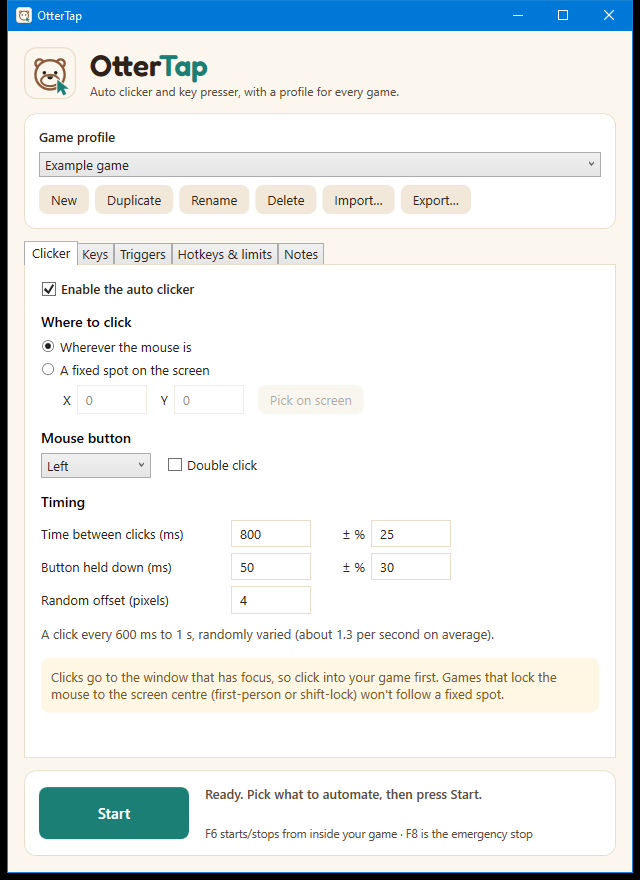
Click wherever your mouse is, or pick a fixed spot on screen. Choose left, right or middle button, single or double click, and any speed from a few milliseconds to hours.
Free for Windows
An auto clicker with human-like timing, a key presser, and screen triggers that react the moment a button appears. Set it up once for each game, then switch profiles in a click.
Windows 10 and 11 · No account needed · Works in most games, including Roblox
Three tools in one
Most players end up with a separate auto clicker, key presser and macro tool. OtterTap puts them in one small window.
Click wherever your mouse is, or pick a fixed spot on screen. Choose left, right or middle button, single or double click, and any speed from a few milliseconds to hours.
Tap any key on a timer. Keys are sent the way a real keyboard sends them, which many games need before they notice a keypress.
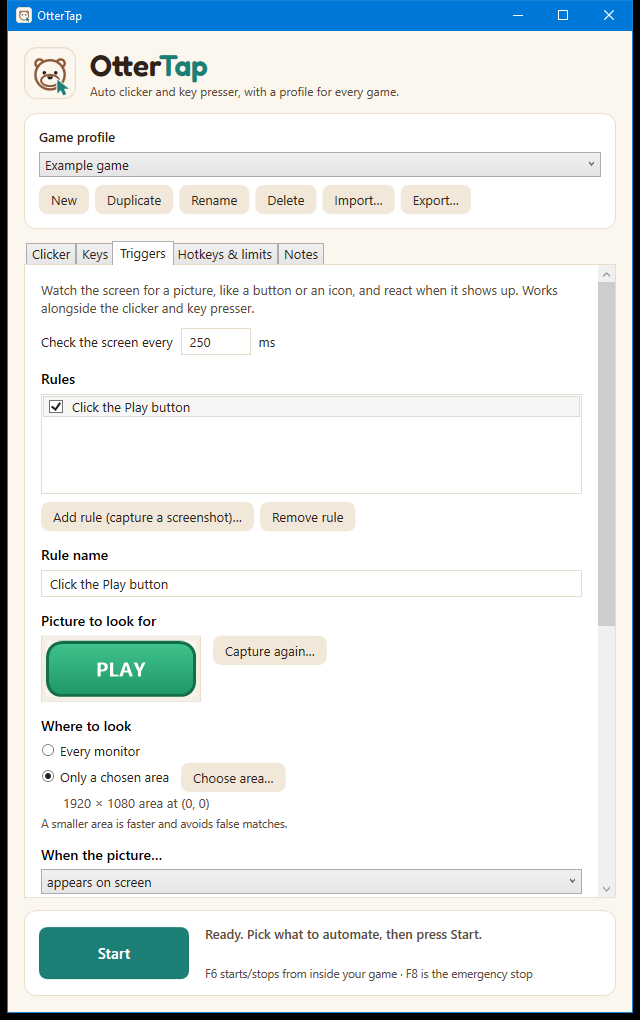
Show OtterTap a picture of a button or icon. When it appears (or disappears), OtterTap clicks it or presses a key for you.
Natural timing
Perfectly regular clicks look robotic. Every timing setting in OtterTap takes a random variation, so no two clicks are quite the same.
A robot
OtterTap
Set a base time and how much it can vary, for example every 800 ms give or take 25%.
Clicks land within a few pixels of the target, clustered near the middle the way a hand would aim.
Screen triggers wait a random fraction of a second before acting, like a person noticing something.
Randomness makes clicking look more natural. It does not make automation allowed: many games forbid it. Please read safety and fair play.
How it works
Give each game its own profile. Its settings, screenshots and hotkeys stay separate from every other game.
Choose what to click or press and how often. For triggers, drag a box around the button you want OtterTap to watch for.
Hit F6 inside your game to start and stop. F8 is always the emergency stop.
Game profiles
What works in one game rarely works in another. Each profile keeps its own click and key settings, trigger pictures, hotkeys and limits, so switching games is a dropdown, not a rebuild.
Emergency stop. Always works.
In your control
Stop after a set time, a number of clicks or a number of key presses, so a run never goes on longer than you meant.
OtterTap only sends ordinary mouse and keyboard input and reads the screen. It doesn't touch the game's files or memory, and it needs no account.
OtterTap is a free Windows app. The beta is nearly ready.